RAG chatbot for an engineering firm's internal knowledge
Engineers lose hours hunting through SOPs, manuals and old project folders. This is how we'd build a retrieval-augmented assistant that answers their questions from your own documents, cites the source and respects who is allowed to see what.
Industry
Industrial engineering
Typical timeline
6–8 weeks
Typical team
3–4 people

The situation
Picture an industrial engineering firm with around 600 engineers working on process plants for chemical and pharmaceutical clients. Twenty years of know-how sits in SharePoint libraries, a Confluence wiki, thousands of vendor manuals and the close-out reports of hundreds of projects.
The knowledge is there, but finding it is slow. A site engineer who needs a bolt torque, a permit rule or a lesson from a similar project either searches SharePoint and gets 400 results, or messages a senior colleague and waits. Senior engineers spend part of every day answering the same questions. New joiners take months to learn where things are. And when the answer comes from memory rather than the current SOP revision, mistakes follow.
The firm doesn't need a chatbot that sounds clever. It needs one that answers from its own documents, shows exactly where each answer came from, and never shows someone a document they aren't allowed to open.
Signs this blueprint fits you
- Your documents are spread across two or more systems, and search in each is poor.
- Senior people answer the same questions repeatedly.
- Your content has access rules that matter: client confidentiality, HR, commercial terms.
- You've tried a generic AI tool and couldn't trust where its answers came from.
What we'd build
- Connectors for SharePoint, Confluence and file shares that sync content nightly and carry each document's access permissions with it.
- A search index that combines keyword and vector search, so it finds both exact codes like "SOP-PIP-014" and questions phrased in plain language.
- An answer service that retrieves the most relevant passages, writes an answer only from them, and cites every source with a link to the page.
- A Microsoft Teams app, plus a simple web app for site tablets, so people ask where they already work.
- An admin view showing what people ask, which answers were rated poorly and which questions had no source, so document owners know what to fix.

How the pieces fit
Sync that respects permissions
Each document is split into passages of a few paragraphs, and every passage keeps the access list of the document it came from. When someone asks a question, the search only looks at passages that person could already open in SharePoint or Confluence. This is the most important design decision, and it has to be built in from the start rather than added later.
Hybrid search
Engineering questions mix exact identifiers with ordinary language. Vector search alone misses document codes and part numbers; keyword search alone misses paraphrased questions. Combining the two, then re-ranking the top results, gives noticeably better answers than either.
Answers with citations
The model is instructed to answer only from the retrieved passages and to number its sources. If the passages don't contain the answer, it says so instead of guessing. Each citation links to the exact page, so an engineer can check the source and its revision in seconds.
Feedback and evaluation
A test set of real questions with known answers is built in the first two weeks and grows over time. Every change to chunking, search or prompts is measured against it before it goes live, so quality improves rather than drifts.
One question, end to end
Here is a typical site question traced through the system.
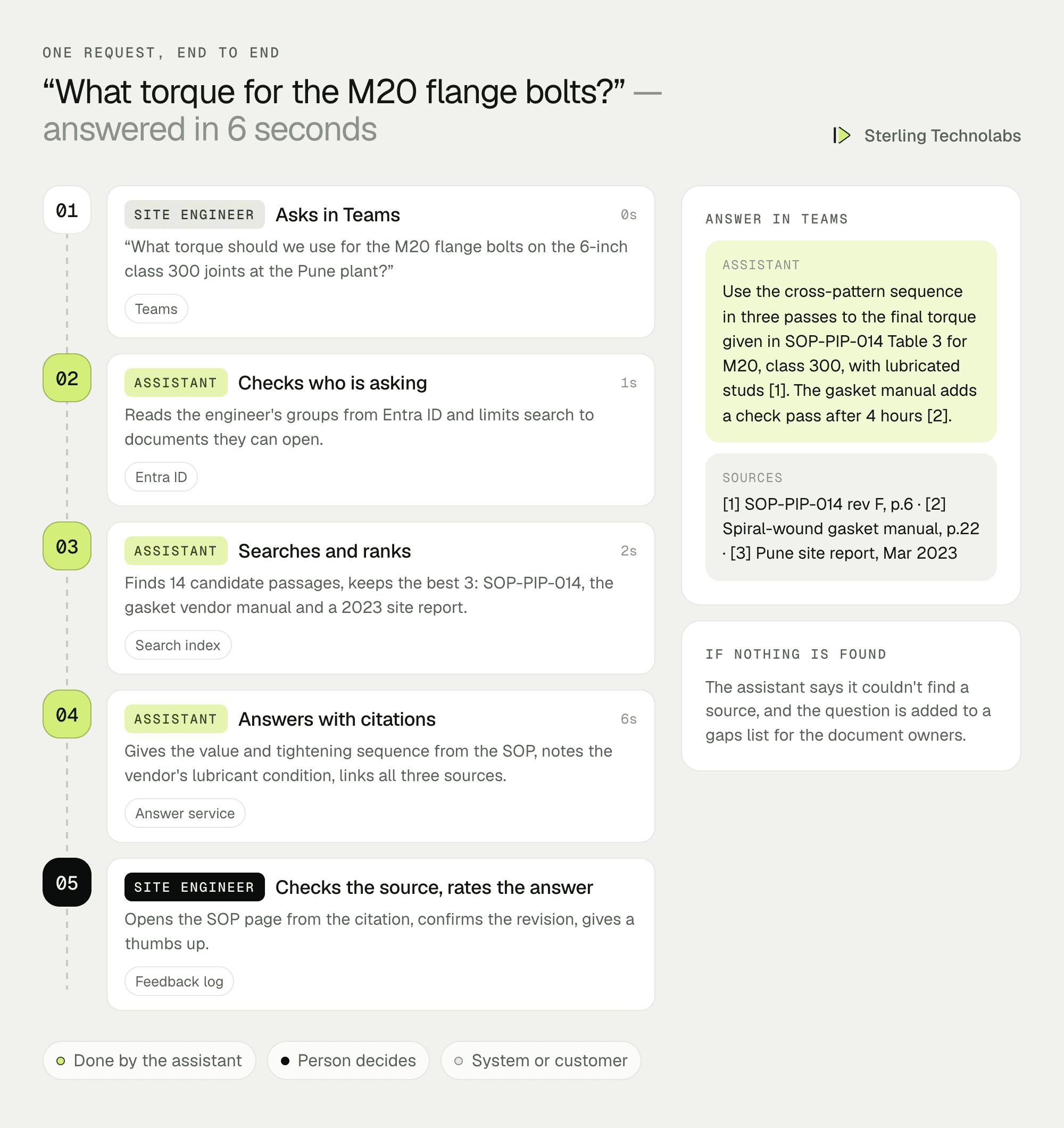
The value isn't just speed. The engineer gets the answer from the current SOP revision, can see the source in one click, and the conversation is logged. If no source had been found, the question would have gone on a gaps list for the piping lead rather than being answered from the model's general knowledge.
What the knowledge team would see

The admin view turns usage into a maintenance list. Questions with no good source show where documentation is missing. Thumbs-down answers show where documents are unclear or out of date. Over a few months, the assistant and the document library improve together.
Sources and how we'd connect
| Source | Content | Permissions | How we connect |
|---|---|---|---|
| SharePoint Online | SOPs, method statements, forms | Site and library groups | Microsoft Graph API |
| Confluence | Engineering wiki, lessons learned | Space permissions | Confluence REST API |
| Vendor manuals and standards | PDFs, often scanned | Usually open to all engineers | File share sync with OCR |
| Project folders | Close-out reports, RFIs | Project team only | Graph API, folder-level access |
| Entra ID | Users and groups | Source of truth for access | Graph API at question time |
Delivery plan
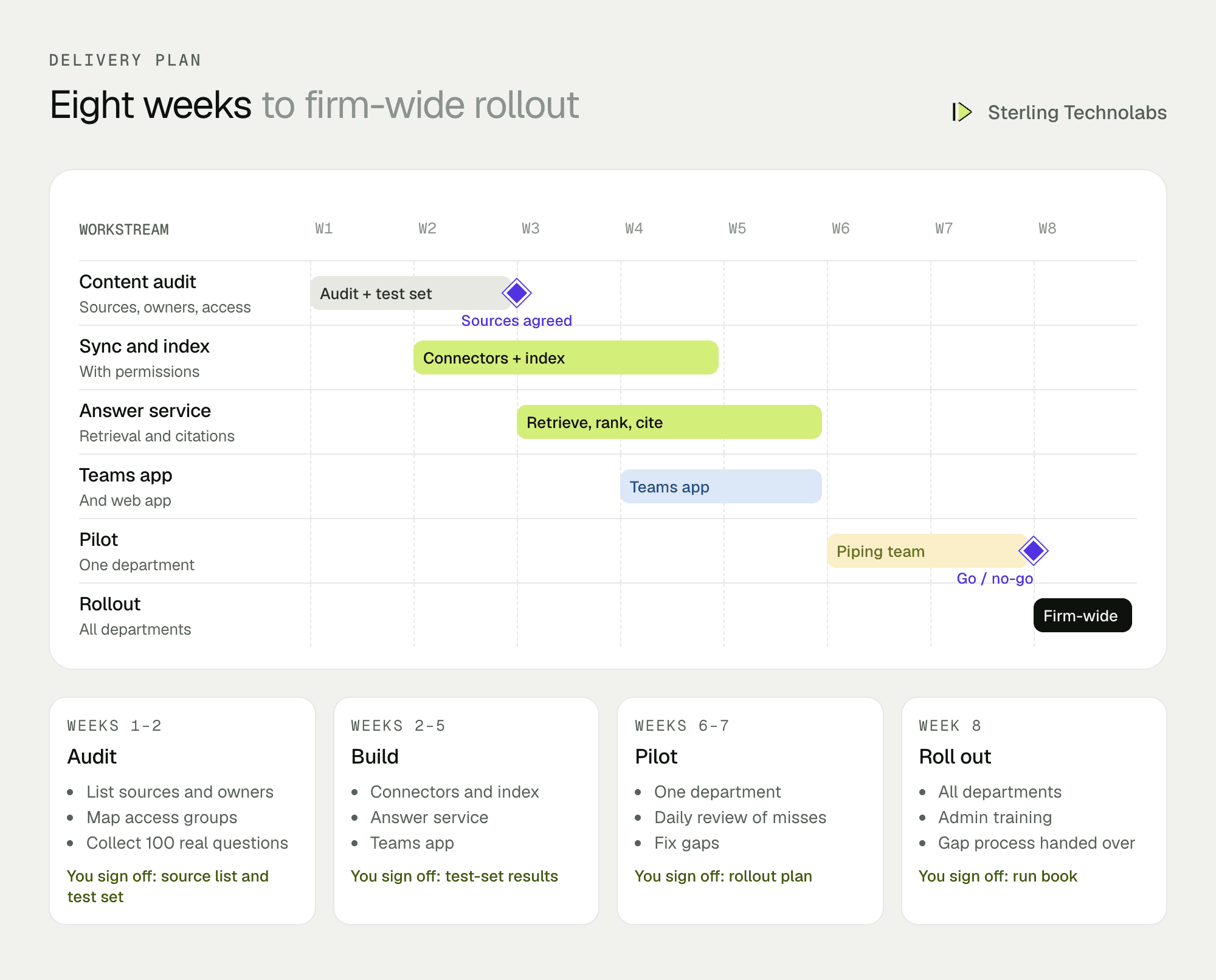
The pilot runs with one department, piping in this example, because its questions are frequent and its SOPs are well kept. Misses are reviewed daily during the pilot. Rollout to other departments follows once the test-set score and pilot feedback meet the agreed bar.
The team
| Role | Time | What they own |
|---|---|---|
| Engagement lead | Part time | Scope, source audit, pilot reviews |
| AI engineer | Full time | Chunking, search, prompts, evaluation |
| Backend engineer | Full time | Connectors, permissions, Teams app |
| QA engineer | Weeks 4–8 | Test set, regression runs, pilot support |
From your side: a knowledge or document-control lead, one engineer per pilot department to write test questions, and IT for Microsoft 365 app approval.
What changes the effort
- Number of sources. SharePoint alone is quickest. Each extra system adds a connector and permission mapping.
- Scanned documents. Old scanned manuals need OCR and more testing than born-digital PDFs.
- Permission complexity. Broken inheritance and per-document permissions in SharePoint take time to map correctly.
- Drawings. Text in drawings and P&IDs can be indexed, but answering questions about the drawing itself is a separate, larger piece of work.
- Languages. English is the baseline. Mixed-language documents add evaluation work.
Risks and how we'd handle them
| Risk | What we'd do |
|---|---|
| Confident wrong answers | Answers only from retrieved passages, with citations. If retrieval is weak, the assistant says it doesn't know. |
| Someone sees a document they shouldn't | Permissions are applied at search time from Entra ID, and tested with accounts from different groups before launch. |
| Outdated revisions | Only current revisions are indexed where document control marks them; superseded documents are excluded or labelled. |
| Low adoption | The assistant lives in Teams, the pilot department helps shape it, and early misses are fixed within days. |
| Client data in prompts | Enterprise model endpoints with no training on your data, or a model hosted in your own Azure tenant. |
What we'd measure
| Metric | How we'd measure it | Baseline from |
|---|---|---|
| Answer accuracy | Score on the test set, reviewed by engineers | Test set built in weeks 1–2 |
| Answers with a source | Share of questions answered with at least one citation | From pilot week one |
| Helpfulness | Thumbs up and down per department | From pilot week one |
| Weekly active users | Unique people asking per week | Pilot department headcount |
| Documentation gaps closed | Gaps raised versus gaps fixed by owners | Builds up from rollout |
Build or buy?
Microsoft 365 Copilot and similar tools can search SharePoint, and if all your content lives there and your licences cover it, try that first. A custom assistant earns its place when knowledge is spread across several systems, when you need tight control over which sources are used and how answers are cited, when you want a test set and admin view tuned to your domain, or when you'd rather choose and host the model yourself. The two can also coexist: Copilot for general office work, a focused assistant for engineering knowledge.
Questions we'd ask on the first call
- Where does your engineering knowledge live today, and roughly how many documents?
- Which department asks the most repeat questions?
- How are access rights managed, and are there documents only certain teams may see?
- Do you have document control that marks current and superseded revisions?
- Where would your engineers prefer to ask: Teams, a web app or both?
FAQ
Will it make things up?
It is built to answer only from your documents and to say so when it can't find a source. Every answer shows its citations, so people can check rather than trust.
Can it search inside drawings?
It can index the text in title blocks, notes and tags. Interpreting the drawing itself, such as tracing a line on a P&ID, is a separate project.
Where does our data go?
The index runs in your cloud account. Model calls go through enterprise endpoints that don't train on your data, or to a model deployed in your own Azure tenant if you prefer.
:: Typical stack
Retrieval-augmented generation, vector database, SharePoint and Confluence connectors, Microsoft Teams, Python
:: Related service
Generative AI development
See the service

Send us your brief. We’ll help turn it into reality
A senior engineer replies within one business day with questions or a first plan: approach, team, timeline and estimate.
More blueprints like this


