AI demand forecasting for an FMCG distributor
Spreadsheet forecasts leave some warehouses short and others overstocked. This is how we'd build a machine learning forecast by SKU and location that planners can trust, question and override.
Industry
FMCG distribution
Typical timeline
10–14 weeks
Typical team
4 people

The situation
Picture a regional FMCG distributor in western Maharashtra carrying around 1,400 SKUs from a dozen brands: detergents, biscuits, tea, personal care. It serves 6,000 retailers from nine depots and plans stock every week in Excel.
The spreadsheet works most weeks. It struggles with the weeks that matter most: the run-up to Diwali, the start of the monsoon, a competitor's price cut or a brand's surprise scheme. Some depots end up short of fast movers while others sit on slow stock that ties up working capital and, for food lines, risks expiry. Planners know the patterns, but with 12,600 SKU-depot combinations nobody can look at every number every week.
The distributor needs a forecast that does the routine work across every combination, points planners to the few dozen that need judgement, and gets measurably better over time. And it needs planners to trust it, which means seeing why a number is what it is and being able to change it.
Signs this blueprint fits you
- You have at least two years of clean-ish sales history by SKU and location.
- Stock-outs and excess stock happen at the same time in different depots.
- Planning is done in spreadsheets that one or two people really understand.
- Festivals, weather or schemes cause big swings that the current method misses.
What we'd build
- A data warehouse with cleaned sales, returns, stock, promotions and calendar data, rebuilt nightly from the ERP.
- A feature pipeline that turns history into signals: recent trend, seasonality, festival and holiday effects, price changes and scheme flags.
- Forecast models that predict weekly demand per SKU and depot for the next eight weeks, with a range around each number.
- A planner app that shows exceptions first, explains the main drivers of each forecast and lets planners override with a reason.
- Connections to send the approved plan to replenishment in the ERP, and accuracy reports to Power BI.
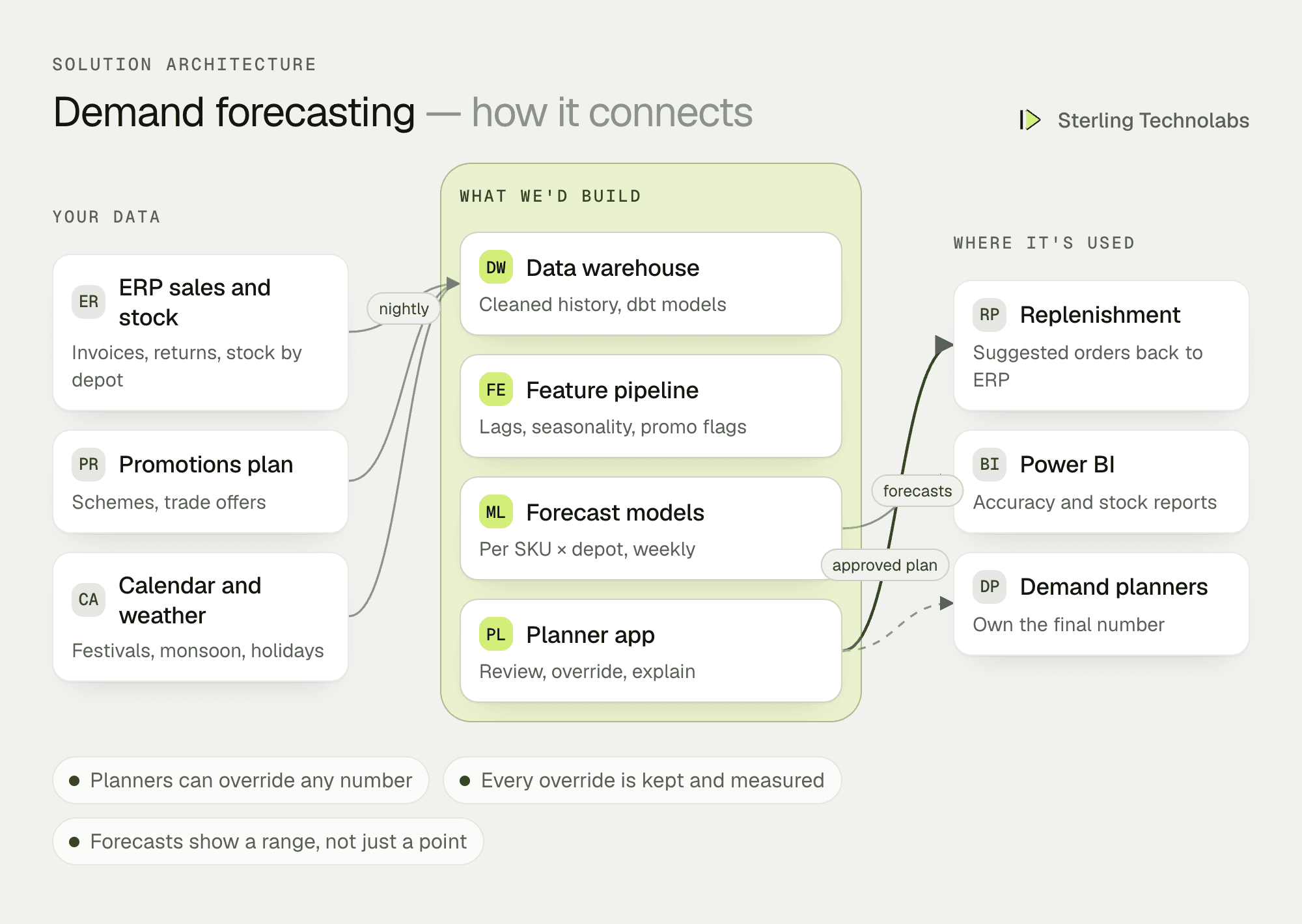
How the pieces fit
The data comes first
Most forecasting projects succeed or fail on data, not models. Returns booked against the wrong week, depots that merged, SKUs that were renamed, stock-outs that make demand look lower than it was: these need fixing before any model can learn. We spend the first weeks on this and measure today's forecast accuracy, so there's an honest baseline to beat.
Models that suit the data
For thousands of related series, gradient-boosted models trained across all SKUs and depots usually beat one model per SKU, because slow movers borrow patterns from similar products. We backtest against a full year of past weeks and compare with the baseline and with simple methods. If a simpler method wins for a group of SKUs, we use it.
Exceptions, not spreadsheets
The planner app doesn't show 12,600 rows. It shows the combinations that need a person: big jumps, new SKUs with little history, last week's large misses and anything touched by a scheme the model can't see.
Overrides are data too
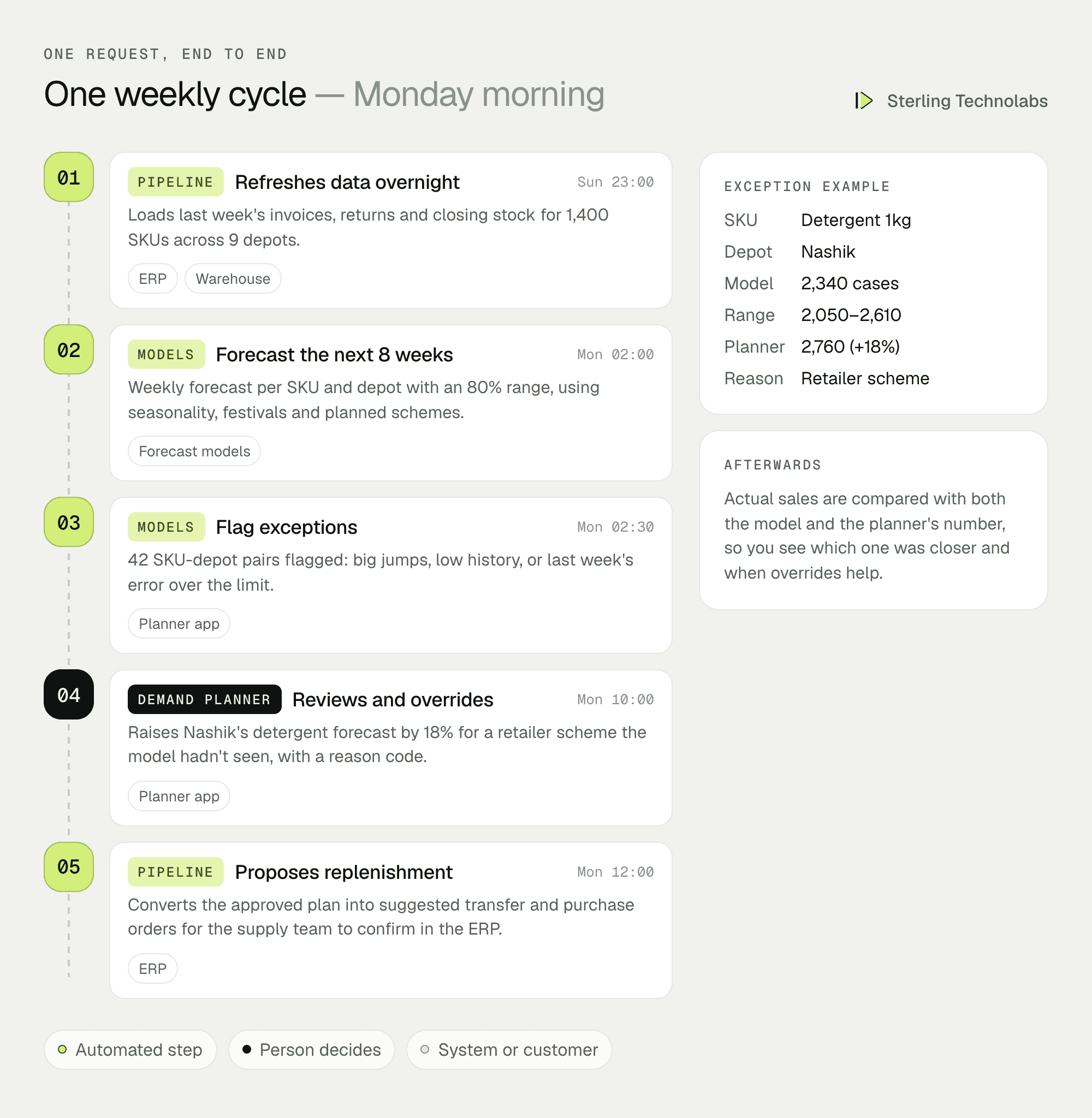
Every override is stored with a reason code. After the week, the model's number, the planner's number and actual sales are compared. Over time you learn which kinds of overrides help, and the model learns from the reasons that keep coming up.
One weekly cycle, end to end
Here is a normal Monday in the new process, including one override for a scheme that wasn't in the promotions plan.
What your planners would see
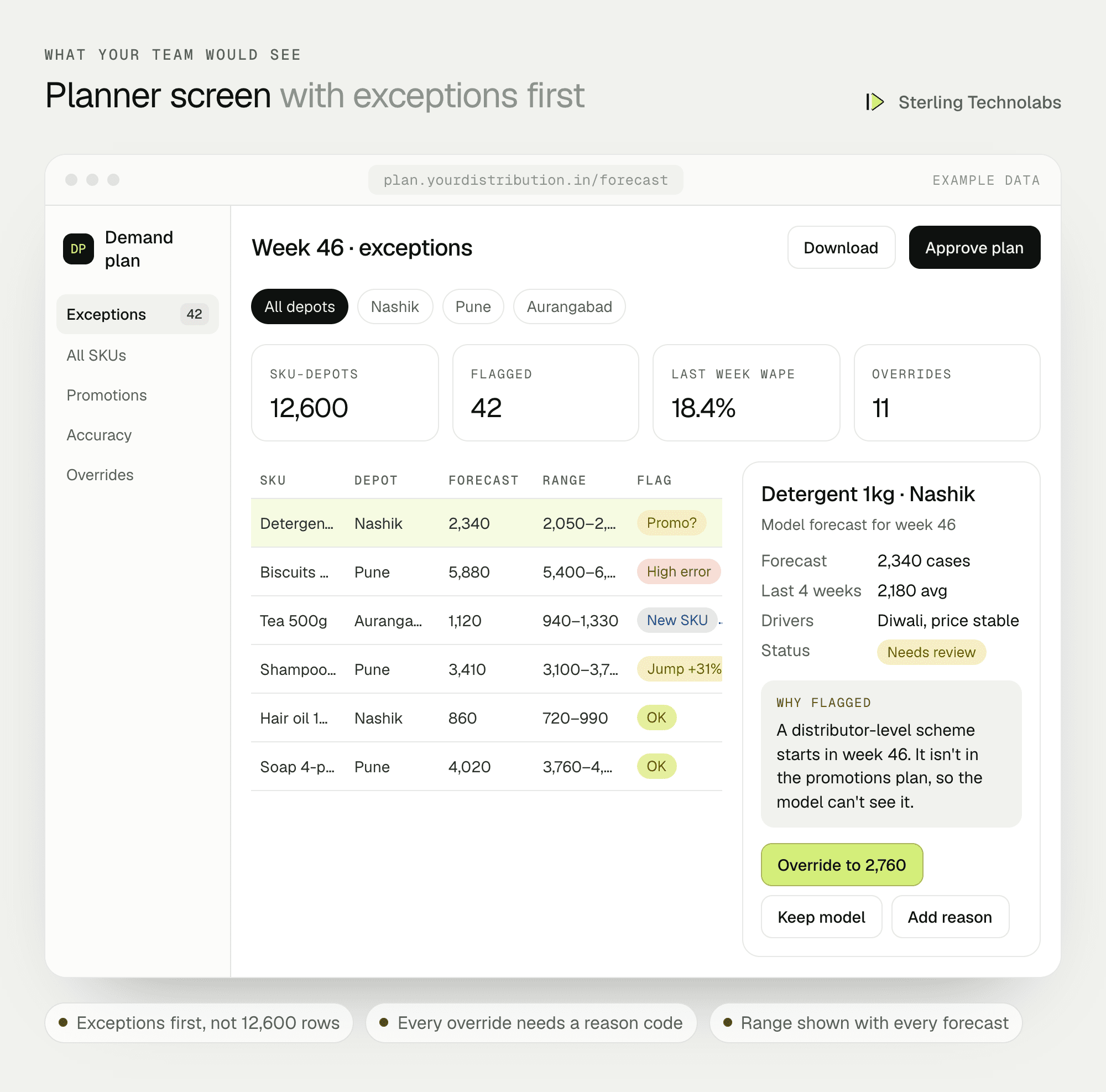
Planners start the week with a short list of exceptions instead of a full sheet. Each one shows the forecast, the range, the main drivers and the reason it was flagged. Approving the plan sends suggested transfers and purchase orders to the supply team, who still confirm them in the ERP.
Data and integrations
| Source | What we use | Frequency | How we connect |
|---|---|---|---|
| ERP (Tally, SAP B1 or similar) | Invoices, returns, closing stock, transfers | Nightly | Database export or API |
| Promotions plan | Schemes, trade offers, price changes | Weekly | Shared sheet or ERP scheme master |
| Calendar | Festivals, public holidays, school terms | Yearly, updated as needed | Maintained table |
| Weather (optional) | Rainfall and temperature by district | Daily | Public weather API |
| Power BI | Forecasts, overrides, accuracy | Weekly | Warehouse views |
Delivery plan
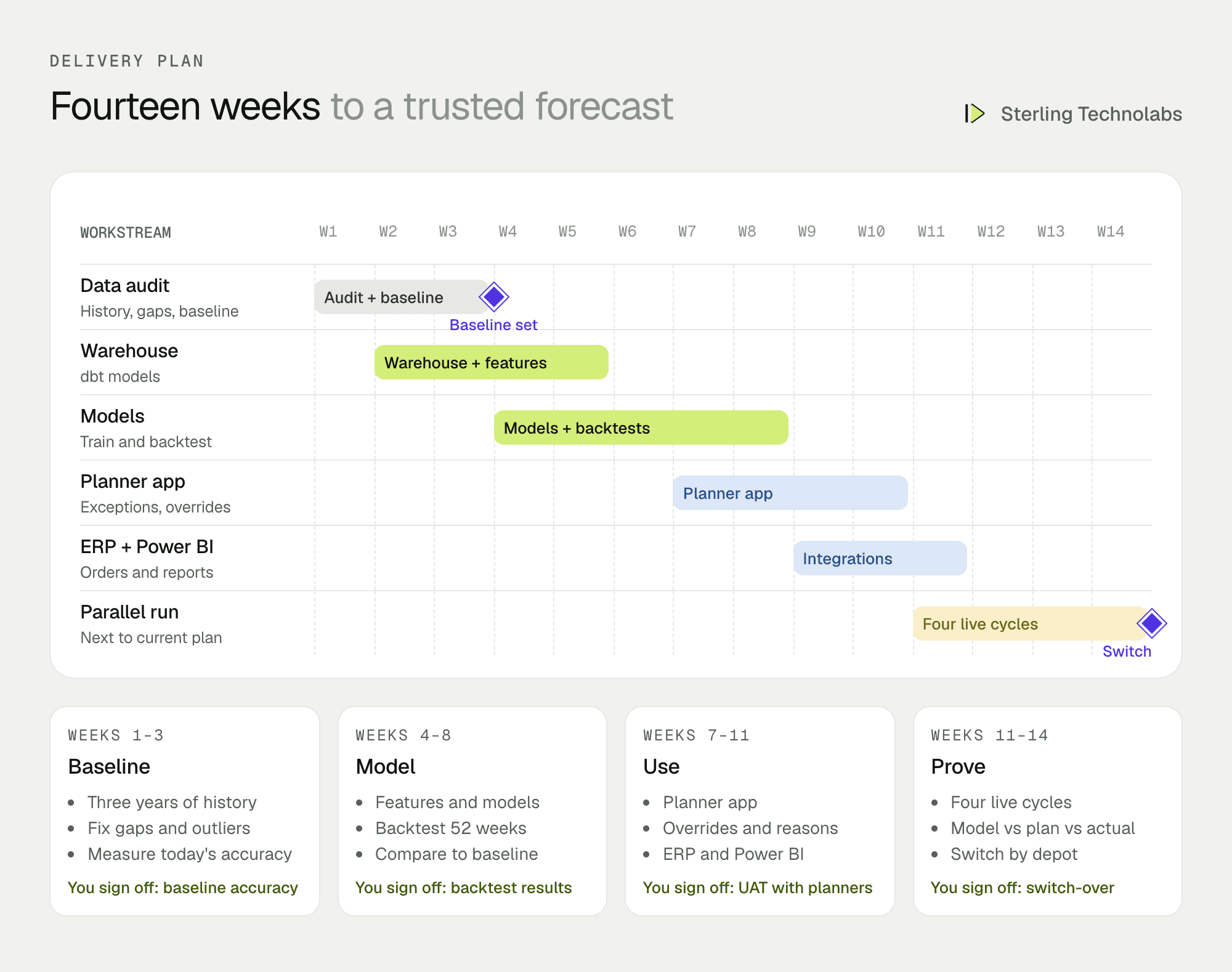
The parallel run is where trust is built. For four weekly cycles, the existing spreadsheet plan and the new forecast run side by side, and both are compared with actual sales. Depots switch over one at a time, starting with the one whose planner is most involved.
The team
| Role | Time | What they own |
|---|---|---|
| Engagement lead | Part time | Scope, planner workshops, weekly reviews |
| Data scientist | Full time | Features, models, backtests, accuracy reporting |
| Data engineer | Full time | ERP extracts, warehouse, dbt models, scheduling |
| Full-stack engineer | Weeks 7–11 | Planner app, ERP order export |
From your side: the head of planning for workshops and sign-off, one planner per depot during the parallel run, and IT for ERP access.
What changes the effort
- Data quality. Clean ERP history with consistent SKU codes is the biggest single factor.
- Granularity. SKU by depot by week is the baseline. Daily or retailer-level forecasts are much larger.
- Promotions data. If schemes live only in emails, building a promotions table comes first.
- Replenishment logic. Suggesting orders is included. Full inventory optimisation with lead times and MOQs is a further phase.
- Number of ERPs. One ERP is simple. Several after acquisitions add integration work.
Risks and how we'd handle them
| Risk | What we'd do |
|---|---|
| History hides lost sales | Weeks with stock-outs are detected and treated as censored demand, not low demand. |
| Planners don't trust the numbers | Exceptions first, drivers explained, overrides allowed, and a parallel run that shows results on their own depots. |
| Events the model can't know about | Schemes and one-off events go in the promotions table; planners override with reasons when they don't. |
| Accuracy drifts over time | Weekly accuracy tracking per category, with retraining on a schedule and alerts when error rises. |
| Over-promising on new SKUs | New products use similar-product patterns and are always flagged for review in their first weeks. |
What we'd measure
| Metric | How we'd measure it | Baseline from |
|---|---|---|
| Forecast error (WAPE) | Weighted absolute error by SKU and depot, weekly | Spreadsheet plans, last 52 weeks |
| Bias | Whether forecasts run consistently high or low | Spreadsheet plans, last 52 weeks |
| Stock-out rate | Retailer orders not fully served | ERP order fill data |
| Days of inventory | Stock value over average daily sales, per depot | ERP stock history |
| Override value | Error of planner number versus model number | Builds up from the parallel run |
Build or buy?
Planning tools with built-in forecasting exist, and larger distributors often use one. They work best when your data already fits their model and your team has time to configure them. A custom build suits a distributor whose data needs real cleaning, who wants forecasts in a simple planner screen rather than a large planning suite, or who wants to own the models and features. A middle path is common: we build the data foundation and forecasts, and they feed whichever planning tool you choose later.
Questions we'd ask on the first call
- How many SKUs and depots, and how many years of history do you have?
- How is the weekly plan made today, and who makes it?
- Where do schemes and trade offers get recorded?
- Which matters more right now: fewer stock-outs or less excess stock?
- Which ERP do you use, and can we get a nightly extract?
FAQ
How accurate will the forecast be?
We won't promise a number before seeing your data. We measure your current accuracy in the first weeks, backtest against it, and you see the comparison before anything goes live.
Can planners still change the numbers?
Yes, always. Planners own the final plan. The system makes their job smaller and records which overrides help.
Do we need a data warehouse already?
No. We set up a lightweight warehouse as part of the project, in Snowflake, BigQuery or your existing cloud.
:: Typical stack
Python, gradient-boosted models, time-series features, dbt, Snowflake or BigQuery, Power BI
:: Related service
Machine learning development
See the service

Send us your brief. We’ll help turn it into reality
A senior engineer replies within one business day with questions or a first plan: approach, team, timeline and estimate.
More blueprints like this


