AP invoice processing automation for a building supplies distributor
Most AP teams still key supplier invoices into the ERP by hand. This is how we'd automate invoice processing for a distributor: read every invoice in the AP inbox, match it to the PO and receipt, and post only what checks out, with people deciding the exceptions.
Industry
Wholesale distribution
Typical timeline
10–12 weeks
Typical team
4 people

The situation
Picture a building supplies distributor in Texas with four branches and a central accounts payable team of five. It buys from about 400 suppliers and receives roughly 6,000 supplier invoices a month. Most arrive as PDFs in a shared AP inbox, some come through supplier portals, and a few still come on paper.
Every invoice is keyed into NetSuite by hand: supplier, invoice number, dates, line items, freight, tax. Then a clerk checks it against the purchase order and the goods receipt. When quantities or prices don't match, the clerk emails the branch or the buyer and waits. Month-end is a scramble, early-payment discounts are missed, and duplicate invoices occasionally get paid because the same PDF was sent twice with a different file name.
The team doesn't need a new ERP. It needs invoice processing automation that does the typing and the matching, and leaves people to deal with the invoices that are actually wrong.
Signs this blueprint fits you
- Your AP team spends most of its day keying invoice data into the ERP.
- You process more than 1,500 supplier invoices a month and most of them reference a PO.
- Invoices sit in a shared inbox and nobody can say how many are waiting or why.
- You miss early-payment discounts or pay late fees because approvals are slow.
- You've looked at off-the-shelf AP automation software but your matching rules or ERP setup don't fit it well.
What we'd build
- Invoice capture from the AP inbox, supplier portals and scanned paper, with every document stored once and duplicates flagged by supplier, invoice number and amount.
- Invoice data extraction that reads the header and every line item, including freight, tax and discounts, and gives each field a confidence score.
- Two-way and three-way matching against open purchase orders and item receipts in NetSuite, using tolerances your controller sets.
- An exceptions queue where clerks see the invoice next to the PO and receipt, with the mismatch highlighted and the fix one click away.
- Approval routing for non-PO invoices (utilities, services, rent) by GL code, branch and amount.
- Posting to NetSuite as vendor bills, with the PDF attached, only after the invoice passes its checks or a person approves it.
- An AP dashboard showing invoices received, matched automatically, waiting on someone, and due for payment this week.
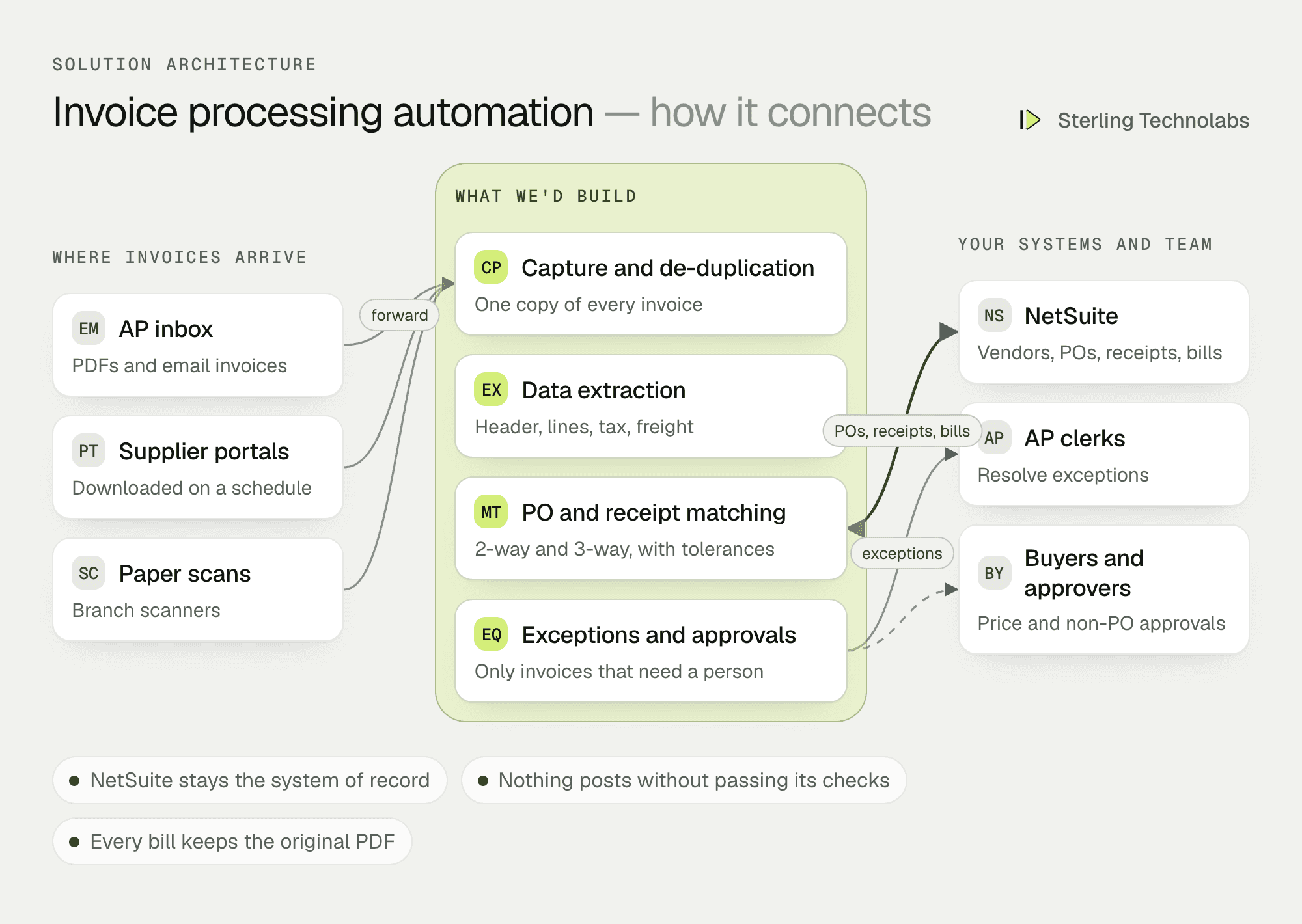
How the pieces fit
NetSuite stays the system of record
Vendors, purchase orders, receipts and bills all live in NetSuite as they do today. The automation reads open POs and receipts through the SuiteTalk REST API and creates vendor bills the same way a clerk would. Nothing about payment runs, approvals in NetSuite or your chart of accounts has to change. The same design works with QuickBooks Online, Sage Intacct, Microsoft Dynamics 365 Business Central or SAP Business One.
Reading invoices
Supplier invoices come in hundreds of layouts. A document extraction model reads each one into a fixed structure: supplier, invoice number, dates, PO reference, line items, freight, tax and total. Every field gets a confidence score. Totals are checked against the sum of the lines, and the supplier is matched against the vendor list by name, address and tax ID, not by the file name. Low-confidence fields are sent to a person instead of being guessed.
Matching
For PO invoices, each line is matched to the PO line by item code or description, then compared on quantity and unit price. Three-way matching adds the received quantity from the item receipt. Tolerances are rules you control, for example a price difference under 2% or under $25 posts automatically, and anything above goes to the buyer.
People handle exceptions
The AP automation workflow is built around the exceptions queue. A clerk sees why each invoice stopped (no PO, price variance, short receipt, possible duplicate, new supplier bank details) and can resolve it, send it to the buyer or branch, or reject it with a note back to the supplier.
One invoice, end to end
Here is a supplier invoice with a price difference on one line, traced from the inbox to a posted vendor bill.
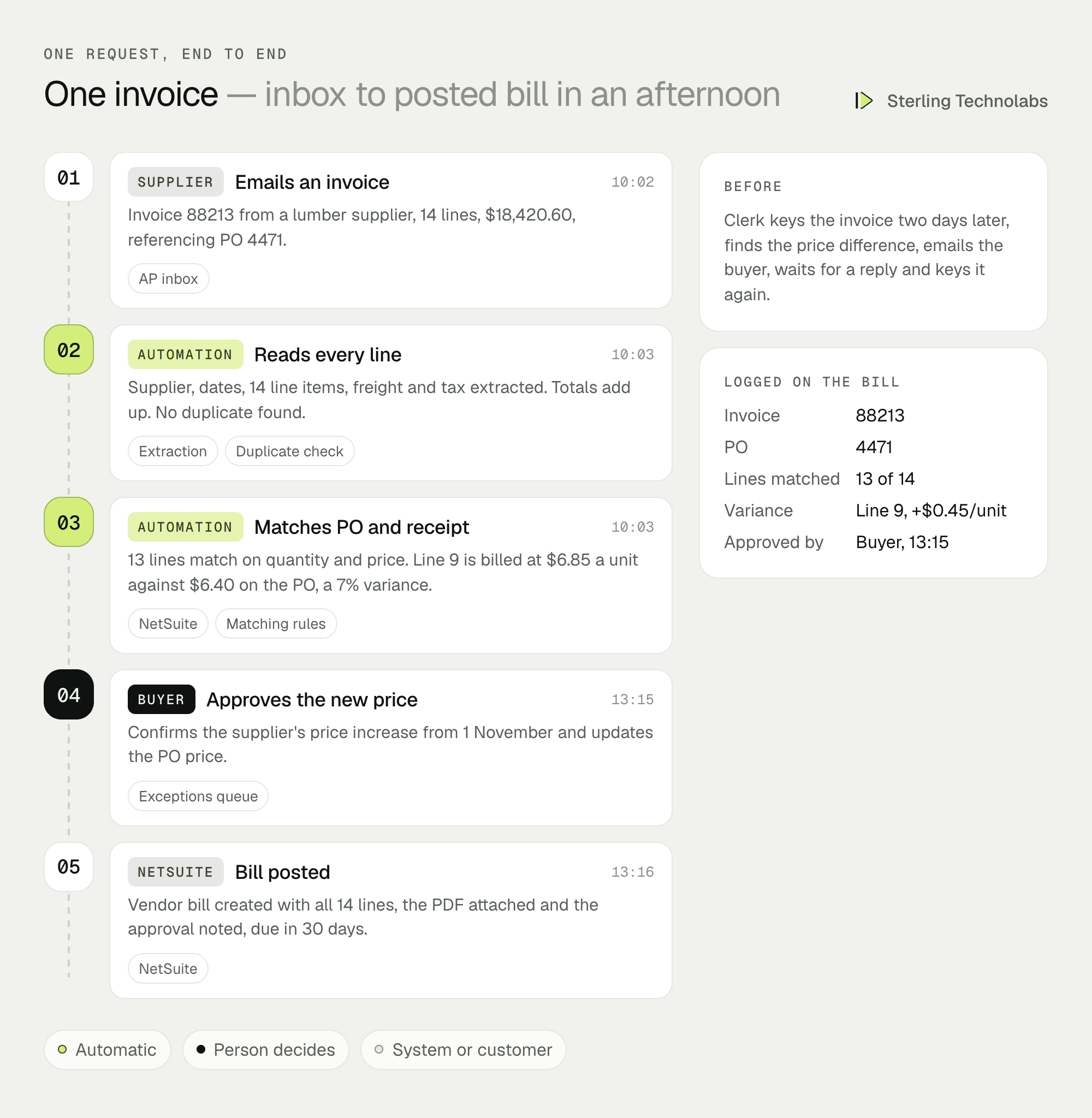
Without automation, this invoice would sit in the inbox, get keyed by hand, fail the check two days later and start an email thread. Here the clean lines are ready immediately, the one real problem goes to the person who can decide it, and the bill posts the same afternoon.
What the AP team would see
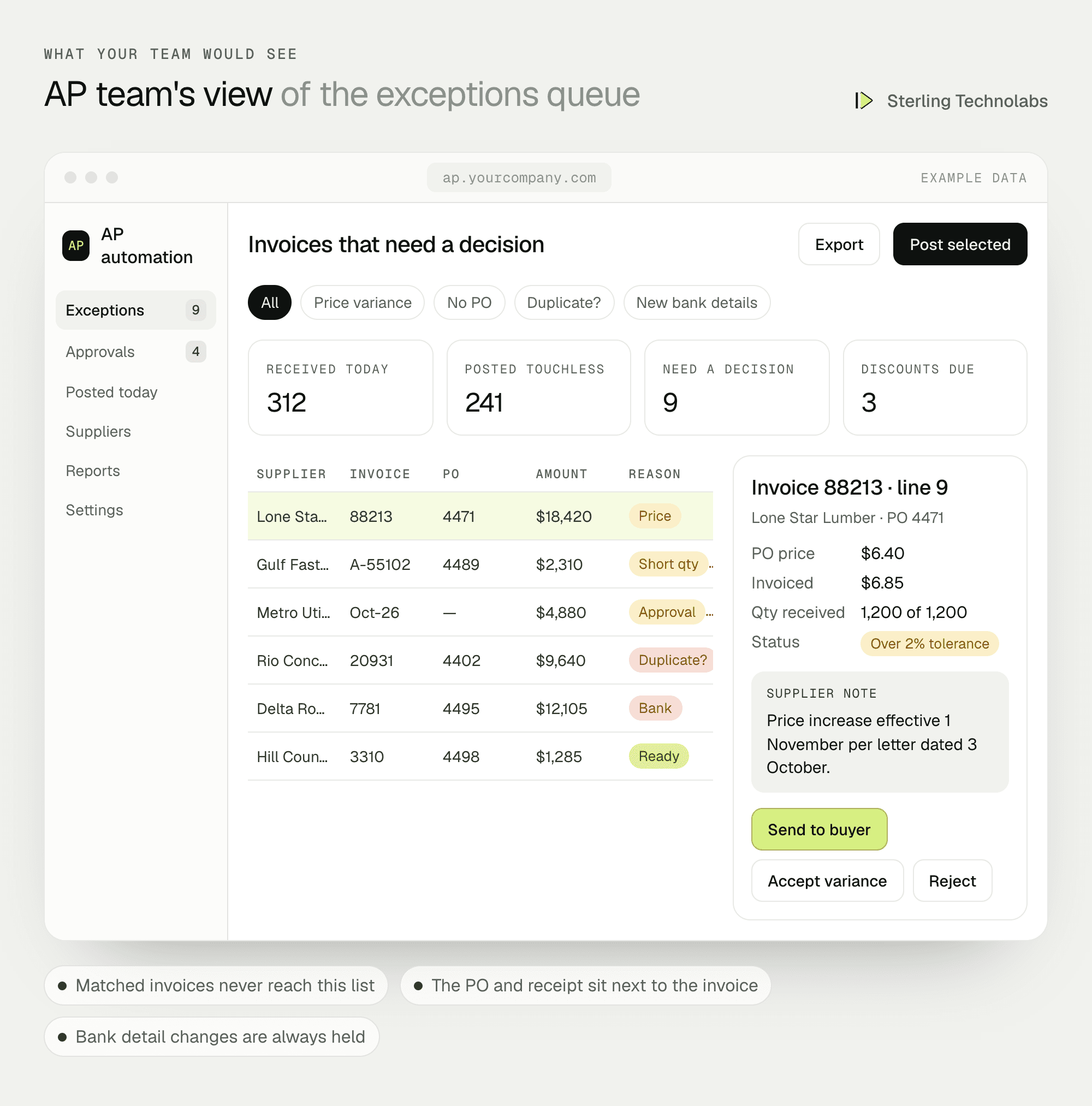
Clerks start the day with a short list: invoices that need a decision, sorted by due date and discount deadline. Everything that matched cleanly is already posted, with the PDF attached in NetSuite for audit.
Data and integrations
| Data | Source | Direction | When |
|---|---|---|---|
| Supplier invoices (PDF, image, email body) | AP inbox, supplier portals, scans | In | As they arrive |
| Vendors and bank details | NetSuite | NetSuite to app | Every 15 minutes |
| Open purchase orders | NetSuite | NetSuite to app | Every 15 minutes |
| Item receipts | NetSuite | NetSuite to app | Every 15 minutes |
| Vendor bills with PDF attached | App | App to NetSuite | On match or approval |
| Approval decisions and notes | App | Stored with the bill | On decision |
Delivery plan
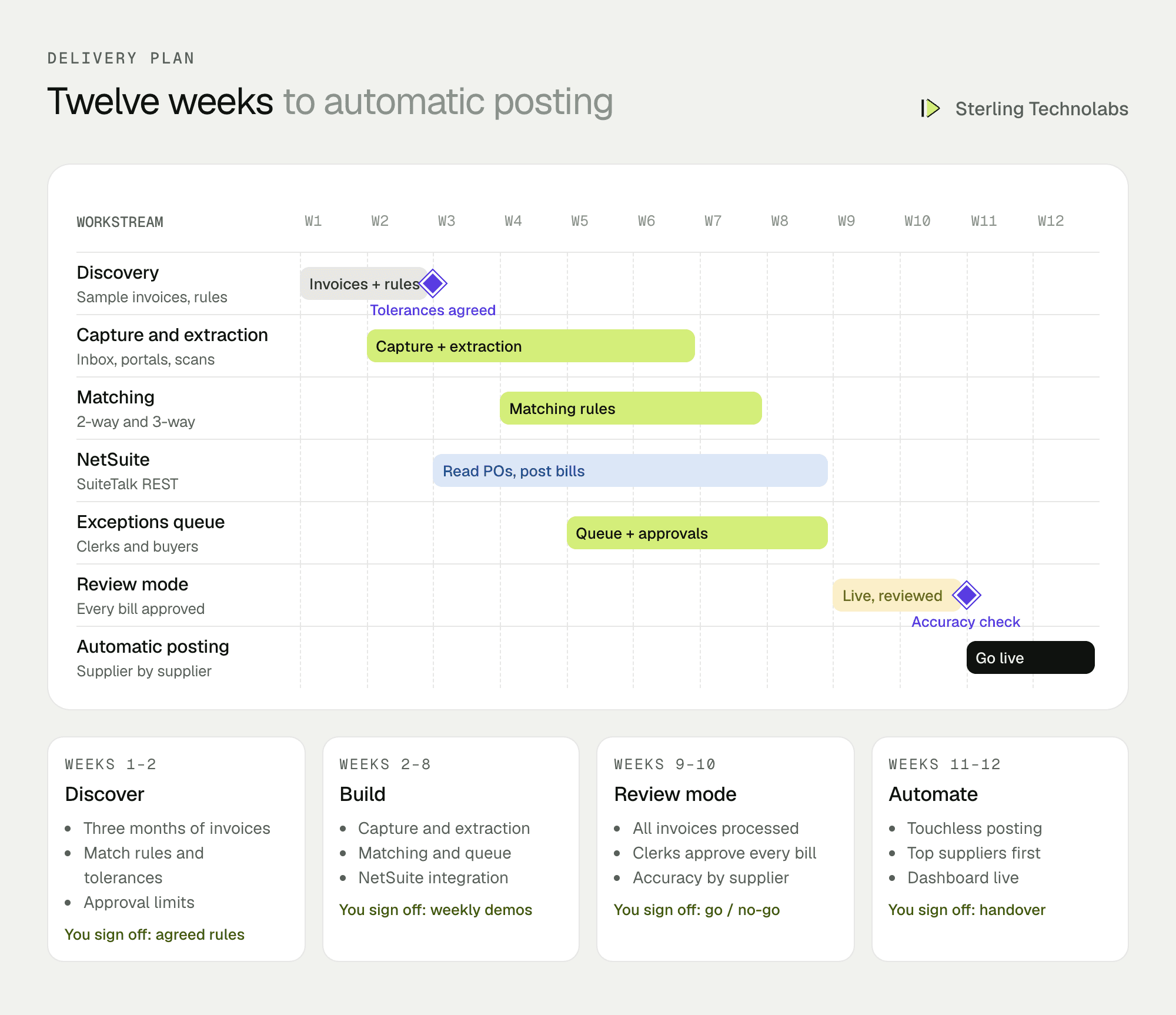
We start with a sample of three months of real invoices, because extraction accuracy and matching rules can only be tuned on your own suppliers. The first live weeks run in review mode: the system prepares every bill, but a clerk approves each one. Automatic posting is switched on supplier by supplier once accuracy is proven.
The team
| Role | Time | What they own |
|---|---|---|
| Solution architect | Part time | Design, NetSuite integration, security |
| Back-end developer | Full time | Capture, extraction pipeline, matching rules, APIs |
| Full-stack developer | Full time | Exceptions queue, approvals, dashboard |
| QA engineer | Weeks 5–12 | Accuracy testing on real invoices, UAT support |
From your side: the AP lead, the controller to agree tolerances and approval limits, and a NetSuite administrator for roles and API access.
What changes the effort
- Share of PO invoices. PO-backed invoices can be matched automatically. Non-PO invoices need approval rules and take longer to tune.
- Line-level matching. Header-only matching is quicker. Line-level three-way matching is where most of the savings are, and most of the work.
- ERP setup. Custom fields, multiple subsidiaries or multi-currency in NetSuite add integration and testing time.
- Paper volume. Scanned paper invoices need a scanning step and are read less reliably than PDFs.
- Payments. Stopping at posted bills is the usual first phase. Adding payment runs and remittance emails is a second phase.
Risks and how we'd handle them
| Risk | What we'd do |
|---|---|
| Wrong values posted | Nothing posts automatically until a supplier's invoices meet an agreed accuracy level in review mode. Low-confidence fields always go to a person. |
| Duplicate payments | Duplicate checks on supplier, invoice number, amount and date, across all channels, before any bill is created. |
| Bank detail fraud | Any invoice showing new or changed bank details is held and flagged, never posted automatically. |
| Supplier layout changes | Extraction doesn't rely on fixed templates, and accuracy is tracked per supplier so a drop is caught within days. |
| Audit questions | Every bill keeps the original PDF, the extracted values, the match result and who approved what, and when. |
What we'd measure
| Metric | How we'd measure it | Baseline from |
|---|---|---|
| Touchless rate | Share of invoices posted without anyone editing them | Zero today |
| Cost per invoice | AP hours divided by invoices processed | Current AP time study |
| Invoice cycle time | Received to posted, in working days | Sample of last quarter's bills |
| Discounts captured | Early-payment discounts taken versus offered | NetSuite payment history |
| Field accuracy | Extracted values that clerks had to correct, by supplier | Review mode results |
Build or buy?
There is plenty of good AP automation software, and for many companies one of those products is the right answer. A custom build makes sense when your matching rules are unusual (partial shipments, landed costs, rebates on the invoice), when your ERP setup is heavily customised, when invoice volumes make per-invoice pricing expensive, or when you want the exceptions queue to fit the way your team already works. It also lets you keep invoice data in your own cloud account.
Questions we'd ask on the first call
- How many supplier invoices do you process a month, and what share reference a PO?
- Which ERP are you on, and how customised is the purchasing and AP setup?
- Do you match at header level or line level today?
- What are the most common reasons an invoice gets stuck?
- Can you share a sample of anonymised invoices from your top 20 suppliers?
FAQ
What is invoice processing automation?
It is software that captures supplier invoices, reads the data from them, checks them against purchase orders and receipts, and posts them to your accounting system, so people only handle the invoices that don't match.
How accurate is invoice data extraction?
It depends on your suppliers and document quality, so we measure it on a sample of your own invoices before going live. Fields the system isn't sure about are always sent to a person rather than guessed.
Does this work with NetSuite AP automation?
Yes. This blueprint uses NetSuite as the example. The same design works with QuickBooks Online, Sage Intacct, Business Central, SAP Business One and other ERPs with an API.
Can it handle invoices without a purchase order?
Yes. Non-PO invoices are coded by supplier history and routed for approval by GL code, branch and amount before posting.
:: Typical stack
Python, OCR and document extraction model, NetSuite SuiteTalk REST API, PostgreSQL, React, AWS
:: Related service
AI integration
See the service

Send us your brief. We’ll help turn it into reality
A senior engineer replies within one business day with questions or a first plan: approach, team, timeline and estimate.
More blueprints like this


