Custom LMS development for frontline training at a restaurant group
Off-the-shelf corporate LMS products are built for desk workers, not cooks, servers and shift leads. This is how we'd build a custom LMS for a restaurant group: short lessons on a phone, practical sign-offs by managers, and reporting by location.
Industry
Restaurants and hospitality
Typical timeline
14–16 weeks
Typical team
5 people

The situation
Picture a restaurant group with 140 locations across the Southeast and about 4,000 hourly employees: cooks, servers, hosts and shift leads. Staff turnover is high, so the group onboards several hundred new people every month. Every new hire needs food safety basics, allergen handling, brand standards and role training before they work a full shift alone.
Training today is a mix of binders, YouTube links shared in group chats, and an off-the-shelf corporate LMS that office staff use but kitchen staff don't. It was built for desk workers: long courses, email logins, no Spanish, and nothing for the practical skills a manager has to watch someone do. District managers can't see which locations are behind, and food safety certificates expire without anyone noticing until an inspection.
The group wants an LMS for corporate training that actually fits frontline work: short lessons on a phone, practical sign-offs by managers, and reporting by location.
Signs this blueprint fits you
- Most of the people you train are frontline or hourly staff, not office workers.
- Your current LMS has low completion because it doesn't work well on phones or in their language.
- Practical skills are signed off on paper, if at all.
- Certifications expire without warning, and audits mean a scramble for records.
- You pay per-user fees for thousands of seasonal or short-tenure staff.
What we'd build
- A mobile-first learner app (iOS, Android and web) with five-minute lessons, videos, quizzes and progress, in English and Spanish.
- Role-based learning paths for each job, assigned automatically when someone is hired or changes role.
- Manager sign-off checklists for practical skills, completed on a phone or the back-of-house tablet, with photo evidence where needed.
- Certification tracking for food safety and alcohol service certificates, with expiry reminders to the employee and their manager.
- An admin and authoring console where the training team builds lessons, imports existing SCORM courses and schedules updates.
- HRIS integration and single sign-on, so new hires get an account and a learning path on day one without anyone creating it by hand.
- Reporting by location, district and role: who is trained to work which station, what's overdue and what expires this month.
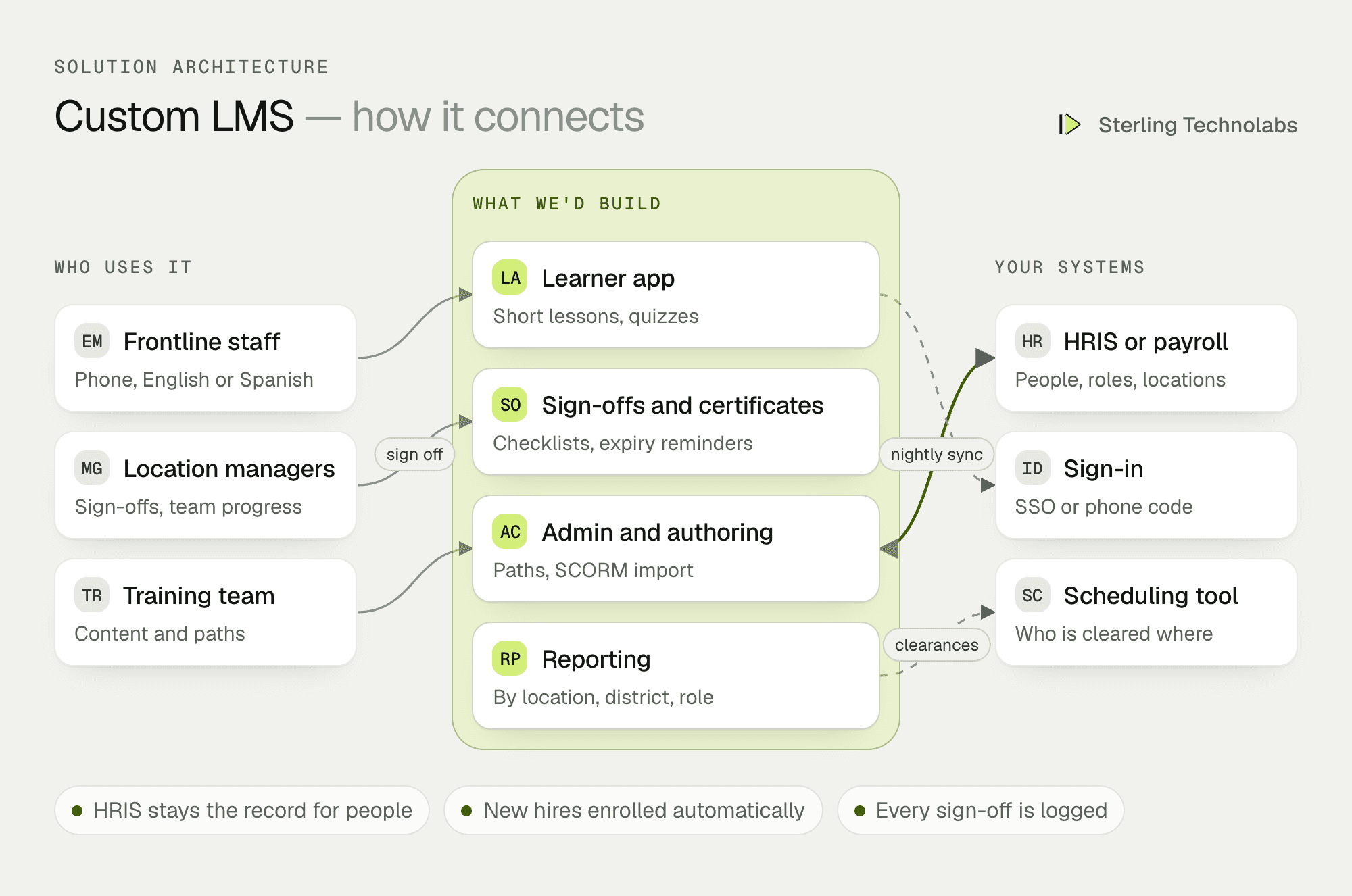
How the pieces fit
Built around jobs, not courses
A corporate LMS usually starts from a course catalogue. This one starts from the job. Each role (line cook, server, host, shift lead) has a path of short lessons and practical sign-offs, and an employee is "cleared" for a station only when both are done. Managers see who is cleared for what before they build the schedule.
HRIS stays the record for people
Employees, locations, roles and managers come from your HRIS or payroll system (ADP, UKG, Workday or similar) every night. New hires are enrolled automatically, transfers change their path, and leavers lose access. Logins use single sign-on or a phone number with a one-time code, because many frontline staff don't have a company email.
Content you already have
Existing SCORM 1.2 and SCORM 2004 courses can be imported and tracked, and new lessons are built in the authoring console from text, video, images and quizzes. Lessons are versioned, so when a recipe or procedure changes, the affected staff are reassigned the updated lesson automatically.
Practical sign-offs
Some skills can't be tested with a quiz. Managers open a checklist for an employee, watch the task, tick each step and sign. The record shows who signed, when, at which location, with a photo if your standard needs one.
One new hire, end to end
Here is a new line cook's first two weeks, from the HR record to being cleared for the grill station.
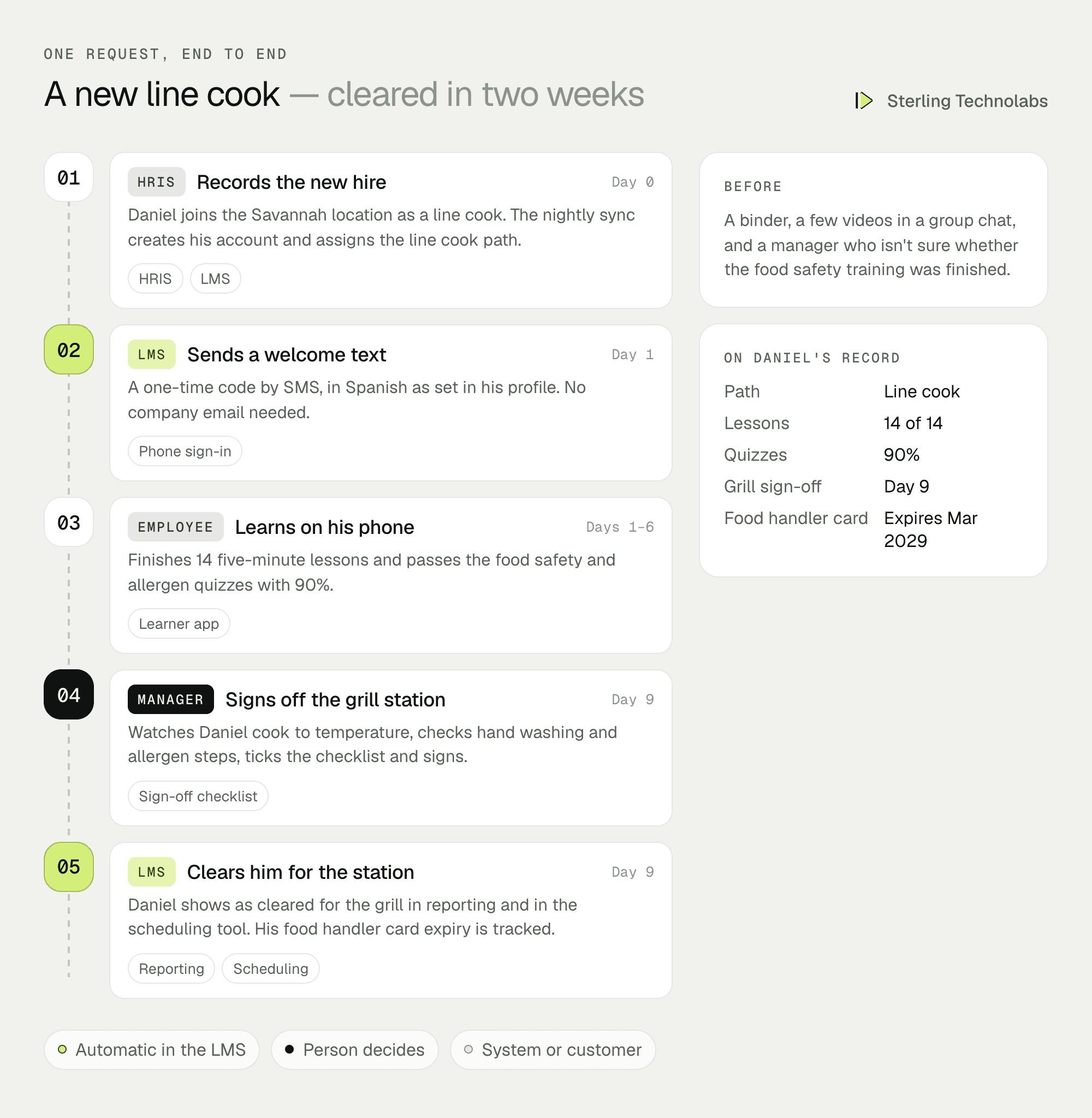
Nothing had to be set up by hand. The cook was enrolled on hire, learned in short sessions on their own phone, and the manager signed off the practical steps in the kitchen. The district manager can see the result the same day.
What managers would see
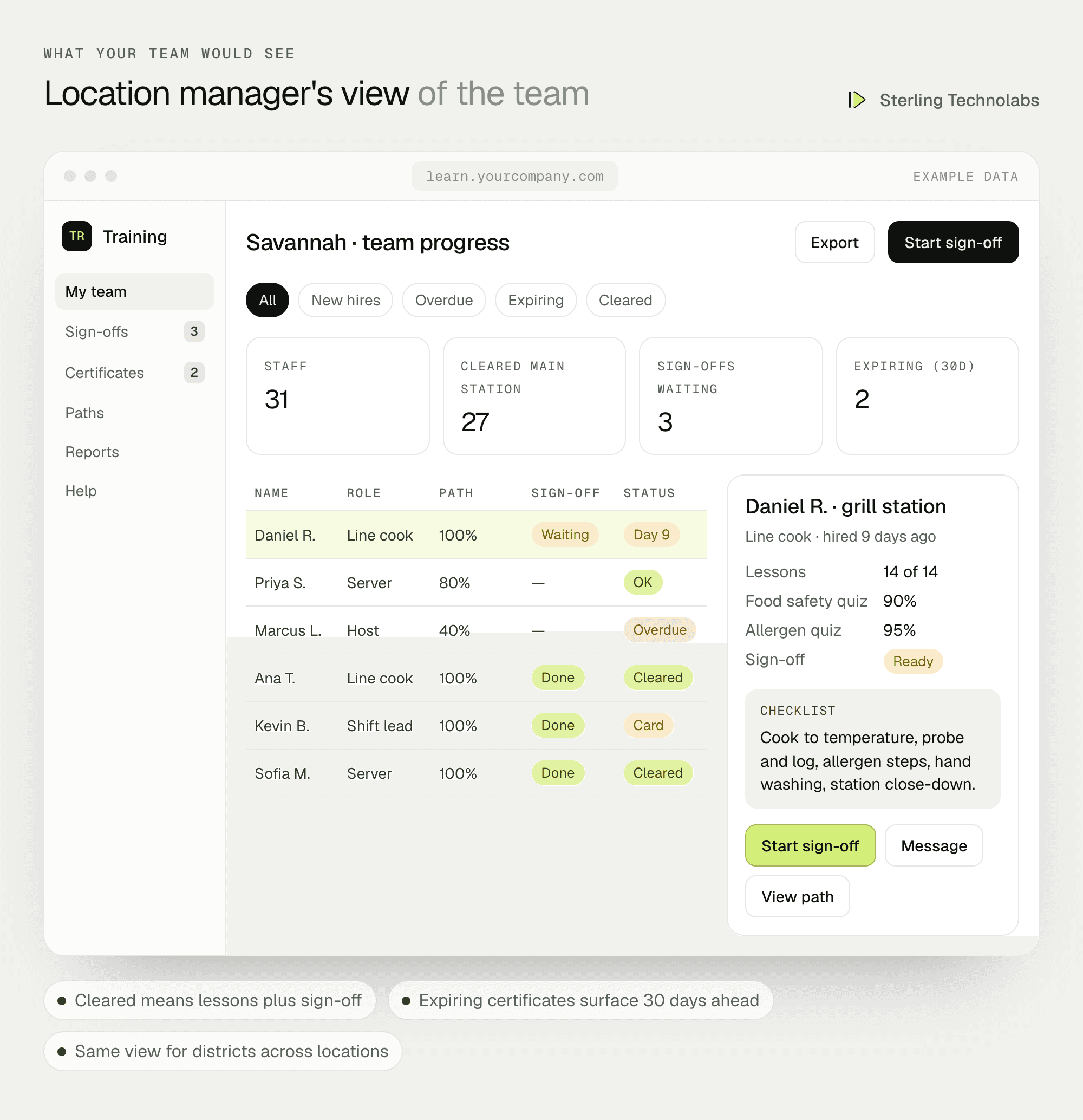
Location managers see their team's progress, who is cleared for which station, and anything overdue or expiring. District managers see the same view across all their locations.
Custom LMS features by user
| Employees | Managers | Training team |
|---|---|---|
| Short lessons on their phone | Team progress by station | Authoring and SCORM import |
| English and Spanish | Practical sign-off checklists | Role-based learning paths |
| Certificates and reminders | Expiring certificates | Versioned lessons and reassignment |
| Progress and badges | Who is cleared to work where | Reports by location and district |
Data and integrations
| Data | Source | Direction | When |
|---|---|---|---|
| Employees, roles, locations, managers | HRIS or payroll | HRIS to LMS | Nightly |
| Logins | Identity provider or phone OTP | Single sign-on | On login |
| Existing courses | SCORM packages | Imported | Once, then as updated |
| Completions and sign-offs | LMS | LMS to HRIS (optional) | Nightly |
| Certificates | Employee uploads or issuer | Stored in LMS | On upload |
| Scheduling (optional) | LMS | LMS to scheduling tool | Who is cleared for which station |
Delivery plan
We'd launch with onboarding paths for the three largest roles, sign-offs and certificate tracking, then add the remaining roles and advanced reporting. Ten pilot locations go first, chosen to include both strong and struggling sites.

The team
| Role | Time | What they own |
|---|---|---|
| Solution architect | Part time | Architecture, HRIS integration, SCORM support |
| Product designer | Weeks 1–6 | Learner, manager and admin journeys, tests with staff |
| Flutter developer | Full time | Learner and manager mobile app |
| Full-stack developers (2) | Full time | Back end, admin console, reporting |
| QA engineer | Weeks 6–16 | Device testing, SCORM tracking, UAT |
From your side: a training lead, an HR systems contact, two or three location managers, and existing training content.
What changes the LMS development cost
- Content. Moving existing content is quick. Creating new lessons and videos is often the larger effort, and we can plan it with your training team.
- Languages. Each language adds translation and review of every lesson and screen.
- Integrations. One HRIS is standard. Scheduling, POS or payroll integrations add phases.
- Standards. SCORM import is standard. xAPI and an external learning record store add work.
- Offline use. Downloading lessons for locations with poor signal adds testing and storage rules.
We give a written estimate after the first call, split by these choices.
Risks and how we'd handle them
| Risk | What we'd do |
|---|---|
| Low completion | Five-minute lessons, phone-number login, Spanish from day one, and tests with real staff during design. |
| Wrong people enrolled | HRIS is the single source for roles and locations, with a daily sync report for HR. |
| Managers skip sign-offs | Sign-offs take under a minute, appear on the manager's home screen, and clearance shows in scheduling. |
| Content goes stale | Every lesson has an owner and a review date, and changes reassign affected staff. |
| Audit gaps | Every completion, score, sign-off and certificate is stored with time, location and signer. |
What we'd measure
| Metric | How we'd measure it | Baseline from |
|---|---|---|
| Time to cleared | Days from hire to cleared for their main station | Manager estimates today |
| Onboarding completion | New hires finishing their path within 14 days | Current LMS reports |
| Expired certificates | Staff working with a lapsed certificate | Last audit |
| Early turnover | Leavers within 90 days of hire | HRIS |
| Licence cost per user | Platform cost divided by active learners | Current LMS contract |
Build or buy?
There are good corporate LMS products, and if your training is mostly compliance courses for office staff, one of them is likely the better choice. A custom LMS makes sense when your learners are frontline staff, when practical sign-offs and station clearances matter as much as courses, when you want training tied to your HR and scheduling systems, or when per-user pricing for a large, high-turnover workforce gets expensive. You also own the platform and can extend it into areas such as recipes, checklists or audits.
Questions we'd ask on the first call
- How many learners, in how many locations, and what roles?
- What does onboarding look like today, and how long until a new hire works alone?
- Which HRIS and scheduling tools do you use?
- How much training content do you have, and in what formats?
- Which certifications do you need to track?
FAQ
What is custom LMS development?
It is building a learning management system around your own training process, roles and systems, rather than adapting your process to an off-the-shelf product.
How much does it cost to build an LMS?
It depends on the number of user types, integrations, languages and content. We give a written estimate after the first call, with a smaller first release as an option.
Can we import our existing SCORM courses?
Yes. SCORM 1.2 and SCORM 2004 packages can be imported and tracked alongside new lessons.
How long does custom LMS software development take?
A first release with learning paths, sign-offs, certificates, HRIS integration and reporting typically takes 14 to 16 weeks, including a pilot.
:: Typical stack
Flutter (iOS and Android), React, Node.js, PostgreSQL, SCORM, HRIS integration, SSO
:: Related service
Custom software development
See the service

Send us your brief. We’ll help turn it into reality
A senior engineer replies within one business day with questions or a first plan: approach, team, timeline and estimate.
More blueprints like this


